New Alnoor Exhibition, Shop 7
Second Floor, Taveta Road, Nairobi CBD
Available now — order before 3:00pm for same-day Nairobi delivery.
Buy the Thrustmaster T.Flight Hotas 4 in Kenya from Mega Store Kenya. Thrustmaster flight stick and detachable throttle with 12 buttons, 5 axes and twist rudder for PlayStation 4…
Hand-wrapped, with a card in your words and an optional video-message QR. Prices hidden, delivered when you say.
Genuine Thrustmaster | Flight Stick And Detachable Throttle | 12 Buttons | 5 Axes | Twist Rudder | PS4, PS5 And PC | Adjustable Stick Resistance
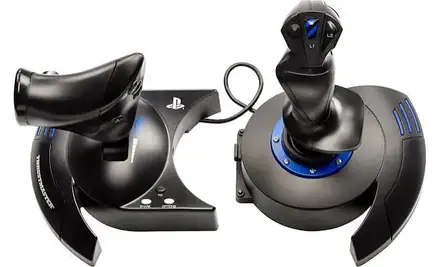
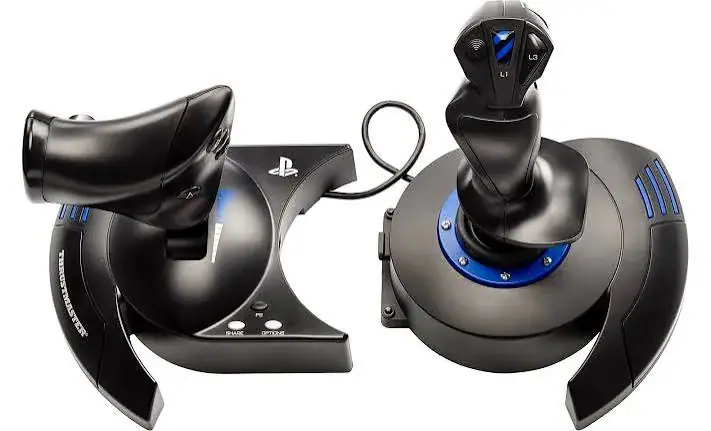
The Thrustmaster T.Flight Hotas 4 is a flight stick with a full-size, detachable throttle, designed for flight simulation games on PlayStation 4, PlayStation 5 and PC. It has 12 action buttons, 5 axes, a twist rudder and adjustable stick resistance. HOTAS stands for hands on throttle and stick, the layout used in real fighter aircraft. Available in Kenya from Mega Store Kenya, this page is for shoppers searching "Thrustmaster T.Flight Hotas 4 Kenya", "Thrustmaster flight stick price Kenya", "buy flight stick Nairobi", "Hotas 4 PS4 PS5", "flight simulator joystick Kenya", "PC flight stick Nairobi" or "Thrustmaster Hotas Kenya".
A flight stick turns a flying game into a pilot's experience. Instead of using thumbsticks, you move a real stick, push a real throttle and twist a rudder. This page explains what the T.Flight Hotas 4 offers, which platforms it works with, where it is limited, and how to check it when it is delivered.
| Feature | Detail |
|---|---|
| Type | Flight stick and detachable throttle (HOTAS) |
| Platforms | PlayStation 4 (officially licensed), PlayStation 5 (listed as compatible) and PC |
| Buttons | 12 action buttons |
| Axes | 5 |
| Throttle | Full-size and detachable; it can be attached to the stick or used separately |
| Rudder | Twist rudder with a locking system, or a progressive tilting lever; optional rudder pedals are sold separately |
| Stick | Ergonomic stick with a large hand rest and adjustable resistance |
| Dimensions | About 26.4 cm wide, 24.2 cm high and 26.5 cm deep |
| Weight | About 2,060 g |
| Colour | Black |
| Warranty | Manufacturer warranty terms depend on the market version; we confirm in writing |
| Cable and connection | Not listed in the page we read; we confirm in the shop |
| Condition | Brand new |
| Available from | Mega Store Kenya, Nairobi CBD |
Specifications come from published manufacturer and retail specification sheets. Gaming accessories are sold in several versions with different colours, model codes and platform labels, so please ask our team to confirm the exact model, colour and version in stock before you pay.
The box contents are not listed in the page we read. We confirm exactly what is in the box for your unit before you pay.
The T.Flight Hotas 4 is for players who want to fly with real controls without spending on a professional setup. It combines a stick and a throttle in one package, with enough buttons and axes to control most of an aircraft. It is aimed at newcomers to flight simulation and at players on PlayStation who want a stick that is officially licensed for their console.
It suits games such as Microsoft Flight Simulator on PC, X-Plane, Elite Dangerous, Ace Combat on PlayStation, War Thunder and other flight and space games. A stick will not suit every game, so check that the games you play support joysticks.
The Hotas 4 is an entry-level HOTAS. It does not have the metal build or the long list of buttons of expensive sticks, but it has the essentials: a stick, a throttle, a rudder and a good number of buttons.
The stick has an ergonomic shape with a large hand rest, and the resistance can be adjusted. Adjustable resistance lets you choose how firm the stick feels. A lighter stick is more responsive, and a firmer stick gives you more control over small movements.
The throttle is full-size and detachable. You can attach it to the stick for a compact desk, or you can separate it and place it on the left of the stick, which is how real aircraft are laid out. Having the throttle separate keeps your left hand on the throttle and your right hand on the stick.
There are 12 action buttons and 5 axes. Axes are the directions of movement: pitch, roll, throttle and rudder, and one more. Buttons let you control actions such as weapons, landing gear, flaps and views.
The rudder turns the aircraft left and right on its vertical axis, and it matters for taxiing, landing in a crosswind and manoeuvring. On the Hotas 4, you control the rudder by twisting the stick handle, which has a locking system if you prefer to lock it, or by using a tilting lever. Many players find twisting the stick comfortable after a short time.
For a more realistic feel, rudder pedals are available as an optional extra. They are sold separately, and we can advise if you want to add them later.
If you mostly fly in games that do not need much rudder control, such as space games, you may not miss pedals.
The Hotas 4 is officially licensed for the PlayStation 4, and it is listed as compatible with the PlayStation 5, although the listing says the full range has not been tested by Sony. It is also compatible with PC. It is not listed for Xbox consoles, so do not buy it for an Xbox.
On PC, the stick is recognised as a game controller, and most flight games let you assign the axes and buttons in their control settings. On PlayStation, the games that support flight sticks will recognise it. Not every game supports flight sticks, so tell us which games you play and we will help you check.
If you play on a PS5, be aware that a PS4 game running on a PS5 will work with the stick, while some PS5 games may not support it. We recommend checking the game you want to play.
Place the stick on a stable surface in front of you, with the throttle to the left. Sit at a comfortable height so your forearm is supported. Use a non-slip mat if your desk is smooth, because a stick that slides around spoils the experience.
Plug the stick into a USB port on your PC or console. On PC, you may be able to install the manufacturer's drivers or software for extra features, and we can advise on this. In your game, open the controls menu, select the stick and assign the functions you need.
Spend time on the settings. Many flight games let you adjust sensitivity and dead zones, which change how the stick responds near the centre. A little time spent here improves the feel.
Do I need rudder pedals? Not to start. The Hotas 4 has a twist rudder in the stick, which is enough to get going. Pedals make rudder control more natural, and they free your right hand from twisting the stick. Many players add pedals after a few months.
Can I use it for games that are not flight games? Some games, such as space shooters and some driving or helicopter games, work with a flight stick. Standard shooters and sports games do not. Check the game's controller options first.
Will it work with my PS5? The listing says the stick is officially licensed for the PlayStation 4 and compatible with the PlayStation 5, although the full range has not been tested by Sony. Support depends on the game, so tell us which game you want to play.
Can I use it on a laptop? Yes, if the laptop has a USB port. The throttle can be used separately, which helps on a small table. Make sure the surface is stable and the cable is not under strain.
How do I look after it? Keep the stick away from liquids and dust. Do not lift the stick by the handle, and avoid forcing the throttle past its limits. Cover it when you are not using it. If a button or axis stops working, tell us before you open the stick.
Before you pay, run through five questions. First, which console or PC will you use, and is it a PlayStation 4, a PlayStation 5 or a PC? The Hotas 4 is not listed for Xbox. Second, which games will you play, and do they support flight sticks? Third, where will the stick and the throttle sit, and is there room on both sides? Fourth, do you want to add rudder pedals later? Fifth, what is your budget for the whole setup?
If you can answer these, you are ready to buy. If you are not sure, talk to us first and we will help you choose.
A flight stick is a hobby purchase, and the best way to enjoy it is to start simple. Learn the basics with the twist rudder and the standard controls, and add extras as your interest grows. Many players find that a basic stick like this one provides everything they need for a long time, and the skills they learn carry over to more advanced equipment.
Flight simulation communities are friendly and full of free advice. Videos, forums and in-game tutorials can help you set up your controls and learn new aircraft, and many of them are free.
Our team can answer these questions in a few minutes. Visit us at Taveta Road in Nairobi CBD, or call or WhatsApp us on 0740 922 861 with your wheel, console and game details, and we will tell you honestly whether this item suits your setup, what is in stock and when we can deliver it, in Nairobi or by courier to other towns.
We can also show you the stick in the shop so that you can feel the resistance, the size of the hand rest and the travel of the throttle before you decide.
Flight simulation is a way of playing flying games with real controls: a stick that moves in every direction, a throttle that you push and pull, and a rudder that turns the aircraft left and right. It feels very different from a standard controller, because your hands do the work of a pilot. A flight stick is a favourite among people who love aeroplanes, aviation and games such as Microsoft Flight Simulator, X-Plane, Elite Dangerous, Ace Combat and War Thunder.
A basic setup has three parts: a stick and throttle, a console or PC to run the game, and a stable place to put the controls. Many people start with a combined stick and throttle on a desk and add rudder pedals, a headset or a head-tracking device later. Each addition makes the experience more realistic.
Every flight game has a controls menu, and a few minutes spent there turns a stick from awkward to enjoyable. Start by checking that the game sees the stick. Then assign the main axes: pitch for moving the nose up and down, roll for banking, throttle for engine power and rudder for turning on the vertical axis. Then assign the buttons you use most to the buttons nearest your thumb and fingers, such as the trigger, the hat switch and the top buttons.
Most games let you adjust the dead zone, which is the small area in the middle of the stick where movement is ignored, and the sensitivity curve, which changes how quickly the aircraft reacts as you push the stick further. A small dead zone makes the aircraft responsive, and a slightly larger one hides small tremors in your hand. Save your settings so that you do not need to repeat them.
A flight stick has a learning curve. In your first few sessions, choose a slow, forgiving aircraft, such as a light trainer, and practise the basics: taking off, keeping the aircraft level, turning, climbing, descending and landing. Use the game's tutorials, many of which are excellent. Do not worry if you crash, because that is part of the fun and the learning.
Real flight is complex and is learned with proper training. A game teaches you the feel of controls, not the safety discipline of real flying. If you become interested in real aviation, a visit to a flying school is a good next step.
A stick and a throttle need space on a desk. The stick should sit in front of you, a little to the right if you are right-handed, with enough room to move it in every direction. The throttle sits to the left. Keep the keyboard and the mouse within reach, because many flight games still need them for menus and extras. If your desk is small, attach the throttle to the stick so that the setup takes less room.
A non-slip mat under the base helps keep it in place, and a desk with a lip or a stop at the back can stop the base from sliding. Do not rest drinks near the controls.
Start with the platform. A flight stick must be made for the console or PC you own, or it will not work. Next, look at the number of buttons and axes. An axis is a direction of movement, such as pitch, roll, throttle and rudder. More axes and buttons let you control more of the aircraft without reaching for the keyboard. Then look at the throttle. A separate throttle gives you a more realistic feel and keeps your hands in a natural position. Finally, look at the rudder. A twist handle or a lever can control the rudder on a basic stick, and pedals are the more realistic option.
You should also think about the space you have. A flight stick sits on a desk or a table, and the throttle needs room on the other side. If your desk is small, a detachable throttle can be used by itself or attached to the stick.
Simulation gear is usually plugged into a console or a PC, and both are sensitive to power problems. Kenya's power can dip, cut and spike, and the spike when power returns is the most damaging. Plug your console or PC into a surge-protected extension, switch the console off properly before a planned outage and unplug expensive equipment during thunderstorms. A small uninterruptible power supply is a worthwhile investment for a PC, because it gives you time to save and shut down.
Cables also need attention. Route USB and power cables along the back of the desk or the frame, with a little slack, and use cable ties so that a pulled cable does not drag a device off the desk. Keep drinks and food away from controllers, wheels and joysticks.
Popular gaming brands are copied, and some sellers pass off older, used or copied parts as new. The copies often have thinner materials, poor finishing and unreliable electronics.
Warranty depends on the market version of the product and on who stocks it. We confirm the model, the version and the exact warranty terms in writing for the specific unit before you pay, and Customer Relations on 0740 922 861 handles warranty questions after purchase. Keep your receipt and the box.
What we like:
What to keep in mind:
Thrustmaster Hotas 4 against a controller. A controller is portable and works in every game. A flight stick offers more precise control in flying games.
Thrustmaster Hotas 4 against a premium HOTAS. A premium set has a metal build and more buttons, and it costs far more. The Hotas 4 covers the essentials.
Thrustmaster Hotas 4 against rudder pedals. Pedals add realism for the rudder. The Hotas 4 has a twist rudder in the stick, and pedals can be added later.
Genuine, brand-new stock from a Nairobi shop you can visit. Mega Store Kenya is at New Alnoor Exhibition, Shop 7, Second Floor, Taveta Road (at the Taveta Road and Taveta Road junction), Nairobi CBD. We are open Monday to Friday 9:00am to 7:00pm, and Sunday 11:00am to 4:00pm (Saturday closed).
Does it work on PS5? The listing says it is compatible with the PlayStation 5, although the full range has not been tested by Sony. We confirm for your games.
Does it work on Xbox? It is not listed for Xbox.
Can I use the throttle separately? Yes. The throttle is detachable.
Are rudder pedals included? No. Optional pedals are sold separately.
Can I pay via M-Pesa? Yes, M-Pesa is accepted.
Do you deliver outside Nairobi? Yes. Outside Nairobi we deliver by courier, typically 1 to 3 business days after dispatch. The delivery charge depends on your location and the size of the item and is confirmed before you pay.
What if it is faulty on delivery? Contact Customer Relations on 0740 922 861 straight away, and we will advise on the next steps.
Available now at Mega Store Kenya. Call or WhatsApp our sales team on 0740 922 861 (WhatsApp) to confirm stock, the version, delivery and what is included, or email [email protected]. Visit us at New Alnoor Exhibition, Shop 7, Second Floor, Taveta Road (at the Taveta Road and Taveta Road junction), Nairobi CBD.
Nairobi: same-day delivery for orders confirmed before 3:00pm on a working day. Rest of Kenya: courier to your door or nearest agent, typically 1–3 business days. You can also collect for free from our shop at New Alnoor Exhibition, Shop 7, Second Floor, Taveta Road, Nairobi CBD.
Faulty or not as described? Tell us within 7 days for a replacement or full refund. Changed your mind? Sealed, unused items can come back within 14 days. See our returns & warranty policy.

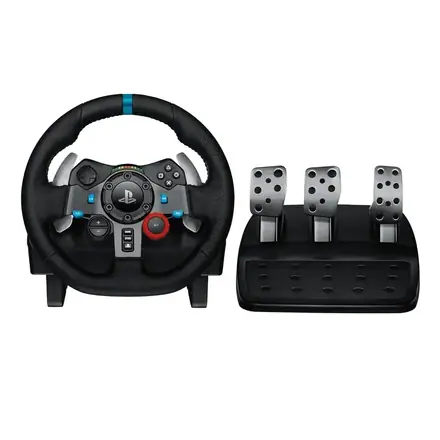
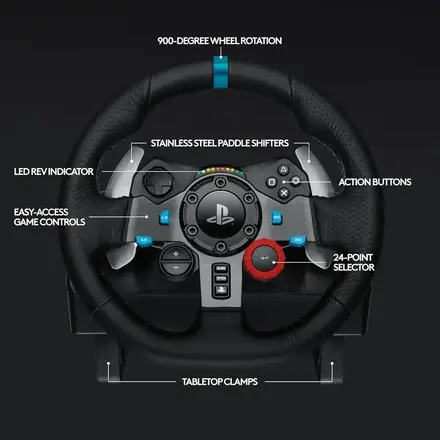
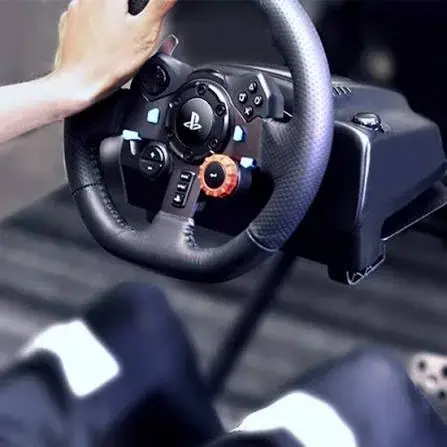
Logitech G29, G920, G923 and Driving Force Shifter compared for Kenya. Prices, compatible racing games, and how much a wheel setup actually improves gameplay.
Meta Quest 3 vs Quest 3S vs PSVR2: The Complete VR Headset Guide for Kenya