
New Alnoor Exhibition, Shop 7
Second Floor, Taveta Road, Nairobi CBD
Available now — order before 3:00pm for same-day Nairobi delivery.
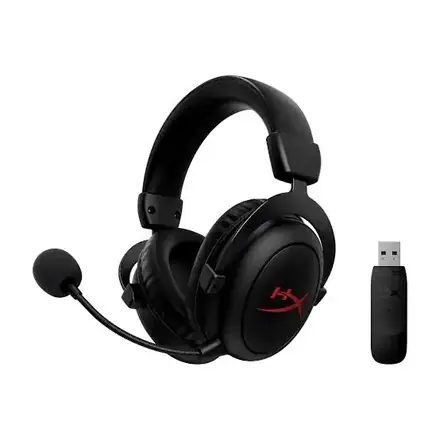
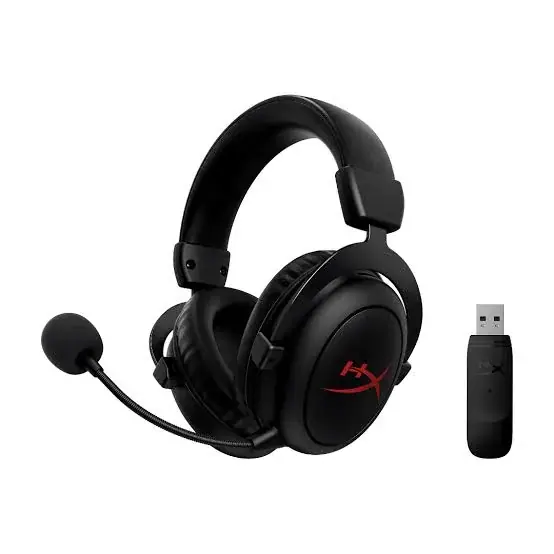
Buy the HyperX Cloud Core Wireless in Kenya from Mega Store Kenya. HyperX Cloud Core Wireless gaming headset with 2.4GHz wireless, 53mm drivers, DTS Headphone:X, 20 hour battery…
Hand-wrapped, with a card in your words and an optional video-message QR. Prices hidden, delivered when you say.
Genuine HyperX | Cloud Core Wireless | 2.4GHz Wireless | 53mm Drivers | DTS Headphone:X | 20 Hour Battery | Memory Foam | Detachable Noise-Cancelling Mic | Aluminium Frame
The HyperX Cloud Core Wireless is a wireless gaming headset with 53mm neodymium drivers, DTS Headphone:X virtual surround sound, a 2.4GHz wireless connection with a listed range of up to 20 metres, a rechargeable battery rated at 20 hours, memory foam and leatherette ear cushions, an aluminium frame and a detachable noise-cancelling microphone. Available in Kenya from Mega Store Kenya, this page is for shoppers searching "HyperX Cloud Core Wireless Kenya", "HyperX Cloud Core Wireless price Kenya", "buy HyperX Cloud Core Wireless Nairobi", "HyperX wireless headset Kenya", "wireless gaming headset Nairobi", "HyperX Cloud Core DTS" or "HyperX headset PS5 PC".
HyperX is best known for comfortable wired headsets, and the Cloud Core Wireless takes that comfort and removes the cable. This page explains what the Cloud Core Wireless offers, which devices it works with, how long it lasts on a charge, where it is limited, and how to check it when it is delivered.
| Feature | Detail |
|---|---|
| Type | Wireless over-ear gaming headset, closed back |
| Speaker drivers | 53mm dynamic with neodymium magnets |
| Frequency response | 10 Hz to 21 kHz |
| Impedance | 60 ohms |
| Sensitivity | 99 dB SPL/mW at 1 kHz |
| Distortion | 1% total harmonic distortion or less |
| Virtual surround | DTS Headphone:X included |
| Wireless | 2.4GHz wireless USB, listed range up to 20 metres |
| Battery | Rechargeable lithium-polymer, rated at 20 hours at 50% volume, about 3 hours to charge |
| Charging cable | 0.5 m USB cable |
| Microphone | Detachable electret condenser, noise cancelling, 20 Hz to 6.8 kHz |
| Chat certification | Discord and TeamSpeak |
| Comfort | Memory foam and leatherette cushions, adjustable aluminium frame |
| Weight | About 283 g, or about 294 g with the microphone |
| Controls | Onboard audio controls |
| Compatibility | The manufacturer's page we read does not list the platforms; PC is the main use. We confirm which console you can use it with before you pay |
| Colours | Black; we confirm in stock |
| Condition | Brand new |
| Available from | Mega Store Kenya, Nairobi CBD |
Specifications come from published manufacturer and retail specification sheets. Gaming accessories are sold in several versions with different colours, model codes and platform labels, so please ask our team to confirm the exact model, colour and version in stock before you pay.
The manufacturer's page lists a 0.5 m USB charging cable and the detachable microphone. We confirm exactly what is in the box for your unit, including the wireless USB transmitter, before you pay.
The Cloud Core Wireless is for players who want a wireless headset without paying for a premium model. It is aimed at PC players who want to sit back from the desk, and at anyone who wants HyperX comfort without a cable. The weight of about 283 g, the memory foam cushions and the adjustable aluminium frame make it a comfortable headset for long sessions.
It is not a headset with lighting, a companion app or Bluetooth. It uses a 2.4GHz wireless connection and it does the basics: sound, a detachable microphone, a long battery and DTS surround.
If you mainly play on a console, check the platform before you buy. The manufacturer's page we read does not list compatible platforms, so we confirm with you which console works with the transmitter.
The Cloud Core Wireless has 53mm drivers with neodymium magnets and a listed frequency response of 10 Hz to 21 kHz. The impedance is 60 ohms and the sensitivity is 99 dB SPL/mW, with distortion of 1% or less. These figures describe a headset tuned for games, with clear mid-range for voices and effects and a solid low end for explosions and engines.
DTS Headphone:X is included. It is a virtual surround technology that places sounds around your head using only two speakers. Many players find it helps them locate footsteps and gunfire, and others prefer plain stereo. You can switch it off if you prefer.
The ear cups are closed back, which reduces outside noise and keeps game sound from leaking out. There is no active noise cancellation, so a noisy room will still be audible.
The headset uses a 2.4GHz wireless USB connection with a listed range of up to 20 metres. That figure is measured in open space, so expect less through walls. In a normal Kenyan home, the headset should work comfortably across a room and often into the next one.
The battery is a rechargeable lithium-polymer unit rated at 20 hours at 50% volume, with about 3 hours to charge from empty. At higher volume you will get less. A 20-hour battery covers several evenings of normal play. A 0.5 m USB cable is listed for charging.
Charge the headset when power is available, and keep a power bank for emergencies. If the headset can be used while charging, that gives a fallback during long sessions, and we confirm this on your unit.
The microphone is detachable, which means you can remove it when you want to listen to music. It is an electret condenser with a noise-cancelling design and a listed frequency response of 20 Hz to 6.8 kHz. The headset is certified for Discord and TeamSpeak, two popular voice chat tools, which means HyperX has tested the microphone for those uses.
Position the boom near the corner of your mouth, test it in a party chat and use the onboard controls to adjust volume. If your voice sounds quiet, move the microphone closer. If it sounds harsh, move it slightly away from your breath.
Voice chat quality is one of the main reasons people choose a branded headset over a cheap one.
The ear cushions are memory foam covered in soft leatherette. Memory foam moulds to your head and makes the headset comfortable for hours, and leatherette blocks outside noise but can feel warm. The frame is aluminium with an adjustable headband.
At about 283 g without the microphone, the headset is lighter than many gaming headsets. A lighter headset puts less pressure on the top of your head and is easier on the neck.
Try it on in the shop if you can. Check that the cups sit over your ears, that the headband is comfortable and that glasses do not press painfully.
Does it work with my PlayStation or Xbox? The manufacturer's page we read describes a wireless USB connection and does not list consoles. The USB transmitter is what carries the sound, and consoles differ in what USB audio they accept. Tell us your console and we will confirm before you pay. If you play on PC, it is a straightforward choice.
Can I use it while it charges? Many wireless headsets can be used while connected to a USB charging cable, and some cannot. The listing does not say, so we confirm on your unit. If you play for long hours, this is worth knowing.
Can I use it with my phone? The page describes the 2.4GHz wireless USB connection and does not list Bluetooth. Treat this as a headset for PC and console, and tell us if you need a headset for your phone.
How is it different from the wired Cloud models? It has no cable and has a battery, and it has a lighter weight of about 283 g. The wired models have no battery and no latency to think about. Choose by how you play.
What if the battery wears out? Batteries lose capacity over the years. If the battery no longer lasts, ask us about options. We do not promise a replacement service, and we tell you what is possible.
A wireless headset is a good fit for a flat or a family home, because it lets you move around without pulling a controller or tripping on a cable. It also lets you sit on the sofa when your console is across the room. The 2.4GHz connection works best with a clear path between the headset and the transmitter, so avoid placing the transmitter behind the TV or inside a cabinet.
Keep the transmitter in a USB port at the front of the console if you can, or use a short USB extension cable. Metal shelving and thick walls reduce range. If the sound cuts out, move closer and check that no other wireless devices are close to the transmitter.
At night, a wireless headset helps you play without disturbing others. Lower the volume, since loud sound over hours can damage hearing, and take breaks. Charge the headset before you sleep, and keep it on a shelf, not on the floor where it may be stepped on.
A final tip: update the headset's firmware if the manufacturer offers it, because updates can fix connection problems. Ask us if you are unsure how.
If you play competitive games, keep the volume at a level where you can still hear a knock at the door, and take a break every hour for your ears and neck.
Before you order the HyperX Cloud Core Wireless, take a minute to think about which console or PC you will use and whether you need Bluetooth. If you are unsure, call or WhatsApp our sales team on 0740 922 861 with the model of your console and what you play, and we will tell you honestly whether this item is right for you.
We would rather lose a sale than sell you something that does not suit your setup. Every item is brand new, we let you inspect the pack and we confirm any detail that is not published before you pay.
You can visit the shop at New Alnoor Exhibition, Shop 7, Second Floor, Taveta Road, Nairobi CBD, to see the item, or we can arrange same-day delivery in Nairobi for orders confirmed before 3pm.
A wireless headset gives you freedom: no cable across your lap, no pulled controller, and the ability to walk to the kitchen between matches. Most gaming headsets connect in one of two ways. A 2.4GHz wireless connection uses a small USB transmitter, often called a dongle, plugged into the console or PC. It is designed for gaming, has very little delay between the screen and your ears, and needs no pairing once the transmitter and headset are matched. Bluetooth connects to phones, tablets and laptops without a dongle, and is convenient for music and calls, but it normally has more delay, so it is less suited to fast games.
Think about four things before you buy. First, battery life: a headset that lasts a full evening is comfortable, and one that dies mid-match is not. Second, the microphone: a boom microphone is clearer than a small microphone in the ear cup. Third, compatibility: a USB transmitter that works with one console may not work with another, so the version you buy matters. Fourth, comfort: you will wear it for hours, so check the weight, the cushions and the headband.
For the 2.4GHz connection, plug the transmitter into a USB port on the console or PC and switch the headset on. The two usually pair automatically. If they do not, hold the power button for a few seconds to start pairing, and follow the quick-start guide. On a PlayStation or Xbox, open the sound settings and choose the USB headset as the output and the input. Some consoles route chat sound differently from game sound, so check the volume of both.
For Bluetooth, switch on pairing mode, open the Bluetooth settings on your phone or laptop and choose the headset. If a headset supports both connections, check how it switches between them, because some models can use both at the same time, and some need a button press. A headset with a 3.5mm socket can also be used wired, which is a good fallback if the battery runs flat.
Wireless headsets use a rechargeable battery. The advertised hours are measured at moderate volume, and real life is usually a little less when the volume is high. To make the battery last for years, charge it before it is completely flat when you can, do not leave it in a hot car or in direct sun, and unplug it once it is full if you charge it often.
Power cuts are a fact of life in Kenya, so charge your headset when power is available, and keep a power bank for emergencies. Use the cable that came with the headset, or a good quality cable, and a surge-protected socket, because voltage spikes when power returns can damage chargers and batteries. A headset with a quick-charge feature is useful when the power is unreliable, since a short charge gives several hours of play.
A 2.4GHz headset works well in the same room and usually through one or two walls, and the range listed by the manufacturer is measured in open space. In a busy Nairobi apartment block with many Wi-Fi networks, microphones and wireless devices, interference is possible. If the sound crackles or drops, move the transmitter closer, use a USB extension cable to bring it out from behind the console, or move other wireless devices away.
Latency means the delay between what happens on screen and what you hear. A good 2.4GHz connection has a very small delay that most people never notice. Bluetooth has a larger delay, which is fine for music and films but may be noticeable in fast shooters and rhythm games. If you play competitive games, use the 2.4GHz connection.
Wipe the ear cushions with a slightly damp cloth now and then and let them dry before use. Sweat and body oils break down faux leather over time, so do not leave the headset in a hot car or in direct sun. Do not pull the cable out by the cord, and do not wrap it tightly around the headband. Keep the USB transmitter in a safe place when you travel, because it is small and easy to lose, and a headset without its transmitter may not work on a console.
If the sound crackles in one ear, test the headset on another device first. If the fault follows the headset, contact us before you try to repair it yourself, because opening it can end any warranty.
Popular headset brands are copied, and a fake can look very similar in the box. The copy often has thinner plastic, a weak battery and poor sound.
Warranty depends on the market version of the product and on who stocks it. We confirm the model, the version and the exact warranty terms in writing for the specific unit before you pay, and Customer Relations on 0740 922 861 handles warranty questions after purchase. Keep your receipt and the box.
What we like:
What to keep in mind:
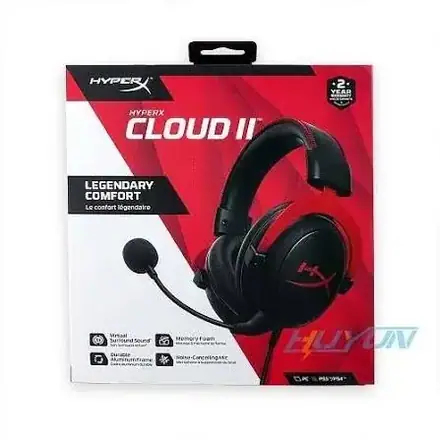
HyperX Cloud Core Wireless against the HyperX Cloud II. The Cloud II is wired and has a USB control box with 7.1 surround. The Cloud Core Wireless has no cable and a rechargeable battery.
HyperX Cloud Core Wireless against the Skullcandy SLYR Pro Wireless. The SLYR Pro has Bluetooth, a 24-hour battery and a companion app. The Cloud Core Wireless has DTS surround and HyperX comfort.
HyperX Cloud Core Wireless against a wired headset. A wired headset has no battery to charge. A wireless headset gives you freedom of movement.
Genuine, brand-new stock from a Nairobi shop you can visit. Mega Store Kenya is at New Alnoor Exhibition, Shop 7, Second Floor, Taveta Road (at the Taveta Road and Taveta Road junction), Nairobi CBD. We are open Monday to Friday 9:00am to 7:00pm, and Sunday 11:00am to 4:00pm (Saturday closed).
How long does the battery last? The manufacturer rates it at 20 hours at 50% volume.
What is the wireless range? Up to 20 metres in open space.
Is the microphone removable? Yes, it is detachable.
Does it work on PS5? The page we read does not list platforms. We confirm for your console.
Can I pay via M-Pesa? Yes, M-Pesa is accepted.
Can I pay via M-Pesa? Yes, M-Pesa is accepted.
Do you deliver outside Nairobi? Yes. Outside Nairobi we deliver by courier, typically 1 to 3 business days after dispatch. The delivery charge depends on your location and the size of the item and is confirmed before you pay.
What if it is faulty on delivery? Contact Customer Relations on 0740 922 861 straight away, and we will advise on the next steps.
Available now at Mega Store Kenya. Call or WhatsApp our sales team on 0740 922 861 (WhatsApp) to confirm stock, the version, delivery and what is included, or email [email protected]. Visit us at New Alnoor Exhibition, Shop 7, Second Floor, Taveta Road (at the Taveta Road and Taveta Road junction), Nairobi CBD.
Nairobi: same-day delivery for orders confirmed before 3:00pm on a working day. Rest of Kenya: courier to your door or nearest agent, typically 1–3 business days. You can also collect for free from our shop at New Alnoor Exhibition, Shop 7, Second Floor, Taveta Road, Nairobi CBD.
Faulty or not as described? Tell us within 7 days for a replacement or full refund. Changed your mind? Sealed, unused items can come back within 14 days. See our returns & warranty policy.
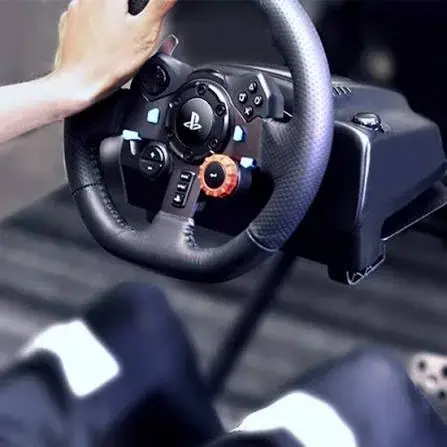
Logitech G29, G920, G923 and Driving Force Shifter compared for Kenya. Prices, compatible racing games, and how much a wheel setup actually improves gameplay.
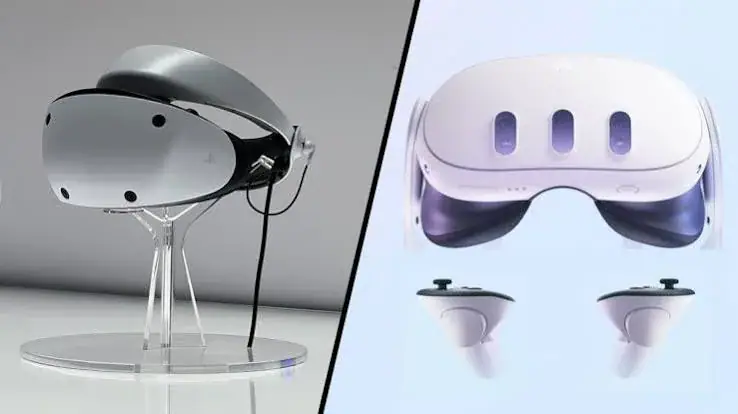
Meta Quest 3 vs Quest 3S vs PSVR2: The Complete VR Headset Guide for Kenya