What Is PlayStation Plus? A Beginner's Guide for Players in Kenya
New to PS Plus? This beginner's guide explains what PlayStation Plus is, what online multiplayer, monthly games, cloud saves and Share Play mean, what the Essential, Extra and Premium plans add, how…
From the Mega Store Kenya team: We wrote it for shoppers in Kenya, and the picks we stock are listed at the end. If you'd rather talk it through, WhatsApp 0740 922 861 or drop by our shop on Taveta Road in Nairobi CBD.
You have unboxed a PS5, or inherited a PS4, or finally decided to join your friends online. Within minutes of setting it up, the console starts asking whether you want PlayStation Plus. Friends say "you need PS Plus to play online". A video says "it comes with free games". An advert mentions "Extra" and "Premium". It all sounds important, and none of it is explained in plain words.
This guide is for beginners. It explains what PlayStation Plus is, what you get for it, which games and features need it, how it differs from buying games, how the three plans compare, how regions fit in, and how to get started in Kenya. It is written for people searching for "what is PS Plus", "do I need PlayStation Plus", "PS Plus for beginners Kenya", "PlayStation Plus explained" and "how does PS Plus work". It uses Sony's own published information, and where Sony does not say something, such as the size of cloud storage, we do not guess.
Mega Store Kenya sells PlayStation Plus memberships for the South Africa, USA, UK and UAE regions, in one-month, three-month and 12-month durations, as well as PlayStation consoles, games and accessories, from our shop at New Alnoor Exhibition, Shop 7, Second Floor, Taveta Road (at the Taveta and Taveta Road junction), Nairobi CBD, and online across Kenya. Sales is on 0740 922 861.
PlayStation Plus in one paragraph
PlayStation Plus is a subscription service from Sony for PlayStation players. While your membership is active, it gives you online multiplayer, monthly games, cloud storage for your saves, Share Play and member offers. Higher plans add a large catalogue of games and, at the top, classics, game trials and cloud streaming. When the membership ends, those features stop until you renew. It is not a console, a game or a one-time purchase. It is a service you rent for a set period, such as a month, three months or a year.
Do I need PlayStation Plus?
You can play a PlayStation without it. Single-player games, games on discs and games you have bought work without a membership. You need PlayStation Plus when you want to play online multiplayer in most games, to claim monthly games, to back up saves to the cloud, to use Share Play or to access a catalogue.
A simple way to decide:
- If you only play single-player games offline, you may not need it at all, although cloud saves and monthly games can still be useful.
- If you want to play online with friends, you need it.
- If you want more games without buying each one, you want a plan with a catalogue.
- If you are not sure, take one month and see.
What you get with PlayStation Plus
According to Sony's PlayStation Plus page, every plan includes the following.
Online multiplayer
This is the headline feature. Online multiplayer lets you play with and against other people over the internet, in games from football and racing to shooters and battle royale. Most online games on PlayStation need an active PlayStation Plus membership to join online matches. Without it, you can still play single-player parts of those games, but not the online modes.
Monthly games
Each month, Sony makes a selection of games available to members. You claim them in the PlayStation Store, and as long as your membership stays active you can download and play them. Sony notes that from January 2026, PS4 games will be added only intermittently. It is a way to build a library over time, and a way to discover games you might not have chosen yourself.
Cloud storage
Cloud storage lets you back up your game saves online and download them to another console. For a player in Kenya, where power cuts and hardware failures can happen, this is a real safety net: if your console breaks, your progress is not lost. Sony's page does not give a storage size, so we do not quote one.
Share Play
Share Play lets a friend join or watch your game session remotely. You can hand over control so a friend can try a game or help you through a tricky level, even when they are in another city.
Exclusive discounts and content
Members see special offers in the PlayStation Store and receive content offers from time to time. What is on offer changes, so look in the Store regularly.
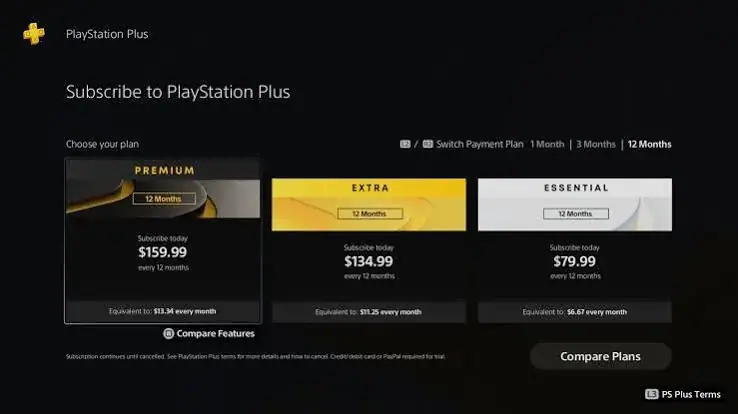
The three plans: Essential, Extra and Premium
PlayStation Plus has three plans. Each includes everything in the one below it.
Essential
The foundation. It includes everything above: online multiplayer, monthly games, cloud storage, Share Play, discounts and content.
Extra
Everything in Essential, plus the Game Catalog, a library of games you can download and play while your membership is active, and Ubisoft+ Classics, which Sony lists as part of the Extra and Premium tiers.
Premium
Everything in Extra, plus the Classics Catalog (classic games from PlayStation history), Game Trials (try selected games before you buy), cloud streaming (stream select PS5 games to a PS5 console and PlayStation Portal, with a minimum connection of 5 Mbps, or 15 Mbps for 1080p, and excluding overseas territories) and the Sony Pictures Catalog.
If you want a detailed comparison, read our guide at /guides/ps-plus-essential-vs-extra-vs-premium-which-to-buy-kenya.
How PlayStation Plus differs from buying games
Beginners often mix up the membership and the games. Here is the difference.
- A game you buy is yours. You can play it as long as you have the disc or the digital licence on your account, with or without PlayStation Plus. Online multiplayer in that game may need a membership.
- A game you claim or download through PlayStation Plus is available while the membership is active. If the membership ends, you cannot play it until you renew.
- A PlayStation Plus membership is a service. It gives you access to features and catalogues for a set time.
Think of buying a game as buying a book, and a catalogue membership as joining a library. You can take books out of the library while your card is valid, and you keep the books you bought.
How online play works on PlayStation
When you play online, your console connects to servers over the internet and joins matches with other players. A stable connection makes a big difference. A few beginner tips:
- Use a cable if you can. A wired connection is generally steadier than Wi-Fi.
- Sit close to your router if you must use Wi-Fi.
- Pause large downloads while playing online.
- Restart your router if the connection feels slow.
- Check your data allowance. Online play itself uses modest data, but game downloads and updates are large.
If you play competitive games, these simple steps matter more than the tier you choose.
Your PlayStation Network account
To use PlayStation Plus you need a PlayStation Network (PSN) account. That account holds your games, your friends, your saves, your wallet funds and your membership. When you create it, you choose a country or region, and that region sets the store you see and the memberships and gift cards that belong on it. This matters, so we have written a full guide: /guides/ps-plus-regions-south-africa-usa-uk-uae-accounts-kenya-explained.
Protect your account. Use a strong, unique password. Turn on two-step verification. Never share your password or verification codes with anyone you do not trust. Keep your recovery email and phone number up to date.
Durations: how long to buy
PlayStation Plus comes in three durations: one month, three months and 12 months. The features are the same for the same plan, and the difference is how long the membership lasts and how often you must renew. A month is the lightest commitment. Three months covers a season. Twelve months is generally the lowest cost per month and the least admin. Our guide is at /guides/ps-plus-1-month-vs-3-months-vs-12-months-which-duration-kenya.
How to get started in Kenya
- Get a PSN account if you do not have one, and note its region. If you already have one, check the region.
- Choose a plan. Essential for online play, Extra for a catalogue, Premium for everything.
- Choose a duration. If you are new, start with one month.
- Contact Mega Store Kenya. Call Sales on 0740 922 861 or write to [email protected], or visit the shop.
- Confirm your region with us, so that the membership matches your account.
- Pay by M-Pesa. We accept M-Pesa.
- We explain how it reaches your account. It is digital, so there is nothing to carry.
- Check the subscription area on your console to confirm the plan and end date: Settings, then Users and Accounts, then Account, then Payment and Subscriptions, then Subscriptions.
- Claim your monthly games in the PlayStation Store, and turn on cloud saves.
- Play. Invite a friend to a game and try Share Play.
Your first week with PlayStation Plus
On day one, check the plan and end date, and claim the monthly games. On day two, set up cloud saves and test your connection with an online game. By the end of the week, try Share Play with a friend, browse the Store for member offers and, if your plan has a catalogue, download one game to try. Write down your end date in your phone. If anything looks wrong, contact us straight away with your account's region and your order details.
Setting up your console for online play
If your PS5 or PS4 is new, a few setup steps make everything smoother.
Connect to the internet
Plug in a network cable if you can, or connect to your Wi-Fi in the console's settings. Run the connection test in the network settings to check that the console can reach the PlayStation Network. If the test reports problems, restart your router and try again.
Sign in with your PSN account
Sign in with the account that holds your membership. If you have more than one account, double-check which one is active on the console, because the membership belongs to a particular account. Make a note of which user profile is yours.
Update the system software
Consoles prompt you to install system updates, which improve stability and add features. Let them finish, and do not switch the console off during an update.
Check your storage
Large games fill storage quickly. Look in the storage settings to see how much room you have, and delete games you have finished. An external drive can add room if you need it.
Set up your controller
Make sure your controller is charged and paired. A charged controller prevents the frustration of dying in the middle of a match. Keep a charging cable handy.
Set up two-step verification
In your account's security settings, turn on two-step verification so that a stranger who learns your password still cannot sign in.
Finding your way around the PlayStation Store
The PlayStation Store is where you claim monthly games, buy games, browse catalogues and see member offers. For a beginner, it can feel crowded. A few tips help.
- Start with the PlayStation Plus section. Here you find the monthly games to claim and, with higher plans, the catalogues.
- Use search and filters. Search by game name, or filter by genre or platform.
- Read the product page. It tells you whether a game supports online play, how large it is and whether it needs PlayStation Plus.
- Check the editions. Games often come in standard and deluxe editions. Make sure you pick the one you want.
- Use your wish list. Add games you like, and you will see when offers appear.
- Watch the download size. Large downloads take time and data.
- Look at the age rating. Especially important when children use the console.
Understanding downloads, updates and data
New players are often surprised by how much data a console uses. Game downloads are large, and updates, called patches, can also be large. Online matches themselves use modest data, but the downloads around them do not. In Kenya, where many people use capped data bundles, these tips help.
- Download over Wi-Fi or a wired connection with a generous allowance, not a tiny mobile bundle.
- Schedule big downloads overnight. Quieter times can be faster.
- Download one game at a time. Several at once slow everything down.
- Turn off automatic updates if your data is limited, and update manually when you have the allowance.
- Delete what you no longer play. Your saves can stay in the cloud.
- Ask a friend with a fast connection to help you download if yours is slow, where the rules allow.
Games that use PlayStation Plus
Many popular kinds of games use online multiplayer, and therefore benefit from PlayStation Plus.
- Sports games. Football, basketball and other sports games have online leagues and friendly matches. These are among the most popular games in Kenya.
- Shooters and battle royale games. Team-based and solo online matches are the heart of these games.
- Racing games. Online races and time trials with players around the world.
- Fighting games. Online matches against other players.
- Co-op adventures. Playing through a story with friends.
- Open-world games with online modes. Many large games have online features.
Whether a specific game needs PlayStation Plus for its online mode is shown on its Store page, and some games have free online modes, so check before you assume.
PlayStation Plus and children
If a child uses your console, PlayStation Plus adds both opportunities and responsibilities. Online play lets a child talk to and play with other people, some of whom they do not know. A few steps keep things safe.
- Use parental controls. The console lets you set age limits, spending limits and communication limits for a child's account.
- Create a child account linked to your family, so that you can manage it.
- Talk about online safety. Explain that they should not share personal details, photos or passwords.
- Check game ratings. Choose games suited to the child's age.
- Set play times. Time limits help children balance gaming with school and rest.
- Keep the console in a shared space where you can see what is happening.
- Review friends lists occasionally and discuss who they play with.
Many parents choose a smaller plan and a shorter duration for a first membership, then adjust.
Is PlayStation Plus safe?
PlayStation Plus is a mainstream service from Sony, and the main risks come from how people use accounts, not from the service itself. The commonest problems are stolen passwords, phishing messages that imitate PlayStation, and sellers who take payment and disappear. You protect yourself by using a strong, unique password, turning on two-step verification, ignoring messages that ask for your password or codes, and buying from sellers you can reach. A shop with an address, a phone line and a receipt, like ours, is a safer choice than an anonymous social media account.
What to do when something goes wrong
You cannot connect online. Check your internet, restart your router and console, and run the connection test. Check that your membership is active. Check PlayStation's service status in case there is an outage.
Your membership does not appear. Check that you are signed in to the right account, check the subscription area, and contact us with your order details.
A game will not start online. Make sure the game is updated and that your membership is active. Restart the game and the console.
You cannot claim a monthly game. Check that your membership is active and that you are signed in to the right account. Try again later in case of a temporary store problem.
Your saves have disappeared. Check your cloud storage in the console's settings, and try downloading your saves. If you cannot find them, contact PlayStation support.
You have forgotten your password. Use the account recovery steps on PlayStation's website, with the email attached to your account.
You think someone else has used your account. Change your password straight away, review your account activity and contact PlayStation support.
A glossary of gaming terms for beginners
Lag. A delay between what you do and what happens on screen, often caused by a poor connection.
Ping. A measure of how quickly your console talks to a server. Lower is better.
Lobby. A waiting area where players gather before a match begins.
Ranked. Matches that affect your rank or rating in a game.
Co-op. Playing together on the same side.
PvP. Player versus player.
DLC. Downloadable content, extra material added to a game after release.
Patch. An update that fixes problems or changes a game.
Digital game. A game you download, with no disc.
Backwards compatible. A newer console that can play games from an older one.
Save. Your progress in a game.
What PlayStation Plus costs you in time, not just money
A subscription is a commitment of attention as well as money. If you buy PlayStation Plus, you also take on a small routine: claim the games, check the end date, keep your account safe and make time to play. Make that routine easy. Put the end date in your phone, claim games on the same day each month and decide in advance how you will use the membership. Players who treat it as a tool, rather than a bill, enjoy it more.
Where to go next
Once you understand the basics, there are a few natural next steps.
- Read our guide to the three plans: /guides/ps-plus-essential-vs-extra-vs-premium-which-to-buy-kenya
- Read our guide to regions: /guides/ps-plus-regions-south-africa-usa-uk-uae-accounts-kenya-explained
- Read our guide to durations: /guides/ps-plus-1-month-vs-3-months-vs-12-months-which-duration-kenya
- Look at our PlayStation gift card guides for your region.
- Visit the shop and ask us anything.
Real beginner stories from Kenyan players
Wambui in Nairobi received a PS5 as a graduation gift and assumed she needed nothing else. A week later her cousins invited her to an online football game, and she found she could not join. She learned that online multiplayer needed a membership, bought one month of Essential, claimed her monthly games and played that same evening.
Dennis in Kakamega bought a second-hand PS4 and wanted to play older games he remembered. He had no idea which games were worth buying. A friend suggested a catalogue tier. He tried one month of Extra, played five games he would never have bought and then moved to Essential when he found his favourite.
Faith in Machakos is a mother of two who wanted her children to play together online without spending a fortune on games. She started with a three-month membership during the school holiday, set up parental controls and agreed play times. At the end of the holiday, she decided to keep a smaller membership.
Salim in Mombasa was a PlayStation fan from the early consoles and wanted to replay old favourites. He took a one-month Premium membership to test the Classics Catalog, loved it and moved to a longer one.
Njeri in Thika nearly bought a membership for the wrong region because a seller never asked. A friend told her to check her account first. She found that the region was different from what she had assumed, and she bought the right one.
What these players share is simple: they started small, learned how they used the service and adjusted. You can do the same.
How PlayStation Plus fits into your gaming budget
Most gamers have a limited budget, and it helps to think about the whole picture. Your costs include the console, the games, accessories, electricity, internet and, for many, PlayStation Plus. Of these, PlayStation Plus is the only one that renews. That is a good reason to treat it thoughtfully.
A practical way to budget is to decide how much you are willing to spend on gaming each month, then split it among games, subscription and accessories. If your budget is small, an Essential membership on a shorter duration and a handful of well-chosen games can give you a lot of fun. If your budget is larger, an Extra or Premium membership can replace some game purchases with catalogue time. Whatever you choose, avoid stretching yourself. Gaming should be a pleasure, not a burden.
Choosing games to play with your membership
A common beginner question is what to play first. Here is a simple approach.
- Claim the monthly games and play the ones that look interesting. They cost you nothing extra while you are a member.
- Ask your friends what they play online. The best online game is the one your friends are playing.
- Try a game in a genre you know you like. If you love football, start with a football game. If you love stories, start with an adventure.
- Use the catalogue if your plan has one. Try a few different genres and drop the ones you do not enjoy.
- Use trials if you hold Premium. Test a game before you buy.
- Read the Store page to check the size, the age rating and whether online play is included.
- Set a limit. Finish a game before you start three more.
Accessories that make PlayStation Plus better
You do not need many accessories, but a few make a real difference.
- A good headset. Online play is more fun when you can talk to your team clearly.
- A second controller. For local play and for when one runs out of charge.
- A charging station for controllers. Controllers die at the worst time.
- A network cable. A wired connection is steadier than Wi-Fi.
- An external drive. Extra space for large games.
- A surge-protected extension. Protection from power surges.
- A good TV or monitor. A screen with low input lag helps in competitive games.
We stock many of these, and our team can recommend options that suit your budget. Visit us on Taveta Road or call 0740 922 861.
Why buy PlayStation Plus from Mega Store Kenya
- A real shop. New Alnoor Exhibition, Shop 7, Second Floor, Taveta Road, Nairobi CBD, open Monday to Friday 9am to 7pm and Sunday 11am to 4pm, closed Saturday.
- Plain explanations. We explain regions, plans and durations in simple words, and we check your account's region before you pay.
- All four regions. South Africa, USA, UK and UAE, in Essential, Extra and Premium, one month, three months and 12 months.
- M-Pesa accepted. Simple, familiar payment.
- Honest answers. If we do not know something, we say we will confirm it.
- After-sales help. We're on 0740 922 861.
- A full range. Consoles, games, gift cards, controllers, headsets, TVs, phones, laptops and more.
Mistakes beginners make
Buying the wrong region. Check your account's region before you pay.
Buying a bigger plan than needed. Start with what you need and move up later.
Forgetting to claim monthly games. You must claim them for them to join your library.
Ignoring the end date. Online play stops when the membership ends.
Downloading too many games. Storage and data are limited. Download what you will play soon.
Sharing account details. Keep your password and codes private.
Skipping cloud saves. Turn them on so your progress is safe.
Assuming PlayStation Plus gives every new game. New releases still need to be bought unless they appear in a catalogue.
Words you will hear
PSN. PlayStation Network, the online service behind your account.
Region. The country store your account belongs to.
Game Catalog. A library of games included in Extra and Premium.
Classics Catalog. Classic games included in Premium.
Game Trials. Time-limited trials of selected games, part of Premium.
Cloud streaming. Streaming select PS5 games instead of downloading them, part of Premium.
Share Play. Remote joining or watching of a game session.
Wallet. Funds on your account, used in the store.
Subscription. A service you rent for a set time and must renew to keep.
Claim. Adding a monthly game to your library through the Store.
Frequently asked questions
What is PlayStation Plus? A Sony subscription service that gives you online multiplayer, monthly games, cloud storage, Share Play and member offers, with higher plans adding catalogues, classics, trials and streaming.
Do I need it to play online? For most online multiplayer games on PlayStation, yes.
Can I play without it? Yes. Single-player games and games you own work without a membership.
Does it work on PS4 and PS5? Yes. Some features have their own requirements.
What happens when it ends? Online multiplayer and membership features stop until you renew. Games you bought stay yours.
Which plan should I start with? Essential if you want online play. Extra if you want a catalogue. Premium if you want everything. If you are unsure, start with Essential for one month.
Which region should I choose? The region of your PSN account.
How do I pay? By M-Pesa. We accept M-Pesa, and shop collection is free.
How quickly will I get my membership? It is digital. We explain the timing and steps when you order.
Can I get help setting up? Yes. Visit the shop or call 0740 922 861.
How to order
Tell us your account's region, the plan and the duration you want. Call Sales on 0740 922 861 or write to [email protected]. Visit us at New Alnoor Exhibition, Shop 7, Second Floor, Taveta Road, Nairobi CBD, open Monday to Friday 9am to 7pm and Sunday 11am to 4pm, closed Saturday. We're on 0740 922 861 for help after purchase.
Related guides
- PS Plus Essential vs Extra vs Premium: /guides/ps-plus-essential-vs-extra-vs-premium-which-to-buy-kenya
- PS Plus regions explained: /guides/ps-plus-regions-south-africa-usa-uk-uae-accounts-kenya-explained
- PS Plus 1 month vs 3 months vs 12 months: /guides/ps-plus-1-month-vs-3-months-vs-12-months-which-duration-kenya
- Shop PlayStation at Mega Store Kenya: /
Final word
One last tip: do not try to learn everything at once. Claim your games, play with a friend and explore a little more each week. In a month, you will wonder why it ever seemed confusing.
PlayStation Plus is simply a service that unlocks online play and adds games and features on top. Pick the plan that matches how you play, match it to your account's region and start with a duration you are comfortable with. If you are ever unsure, call us on 0740 922 861 or visit the shop on Taveta Road, and we will explain it again, in plain words, as many times as you like.