PS Plus Premium Extras Explained: Classics, Game Trials and Cloud Streaming in Kenya
What do you really get with PlayStation Plus Premium in Kenya? A plain guide to the Classics Catalog, Game Trials, cloud streaming, the Sony Pictures Catalog and the internet speed you need, from…
From the Mega Store Kenya team: This guide sums up what we explain to customers choosing gaming accessories at our Nairobi CBD shop. If you'd rather talk it through, WhatsApp 0740 922 861 or drop by our shop on Taveta Road in Nairobi CBD.
PS Plus Premium Extras Explained: Classics, Game Trials and Cloud Streaming in Kenya
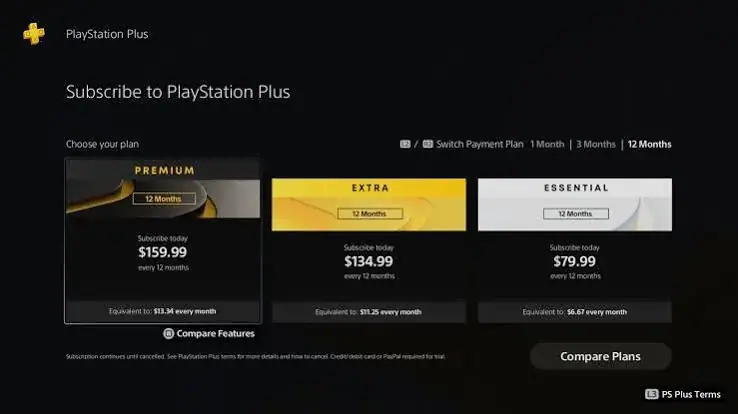
PlayStation Plus Premium is the top of Sony's three membership plans, and it is also the one that causes the most questions. Essential is easy to understand: online multiplayer, monthly games and some extras. Extra adds a big catalog of games to download. Premium adds a further set of features on top, and those extras are where Kenyan players need to think carefully, because some of them depend heavily on your internet connection and some depend on where you live.
This guide, written by the team at Mega Store Kenya in Nairobi, explains the Premium extras one by one, in plain words: the Classics Catalog, Game Trials, cloud streaming and the Sony Pictures Catalog. We also explain who benefits from Premium, who does not, and what to check before you choose it. If you are still deciding between the three plans, read our Essential vs Extra vs Premium guide first, and come back here when you want the detail on Premium.
We describe only what Sony publishes about its plans. Catalogs change from month to month, some features depend on your region and your internet connection, and where something cannot be promised, we say so.
Quick recap: what each plan includes
Sony describes three tiers of PlayStation Plus. Understanding the structure makes the Premium extras easier to follow.
| Plan | What it includes |
|---|---|
| Essential | Online multiplayer, monthly games, cloud storage for saves, Share Play, and exclusive discounts and content |
| Extra | Everything in Essential, plus the Game Catalog and Ubisoft+ Classics |
| Premium | Everything in Extra, plus the Classics Catalog, Game Trials, cloud streaming and the Sony Pictures Catalog |
Two notes. First, the exact catalogs and monthly games change over time, so treat any list of titles as a snapshot. Second, Sony does not state a cloud storage size on its tier page, so we do not quote one. Ask us if you need to know the current figure for your region.
Premium is therefore Extra plus four things. The rest of this article covers those four things in turn.
Extra 1: The Classics Catalog
What it is
The Classics Catalog is a collection of older games from earlier PlayStation generations that you can play as part of your Premium membership. Sony describes it as part of the Premium tier, and it is what makes Premium attractive to players who love retro gaming or who missed the earlier consoles.
Why people like it
- Nostalgia. Many players grew up with older PlayStation games and want to revisit them.
- Games they missed. Players who joined PlayStation later can discover classics they never owned.
- Variety. Older games are often shorter, sharper and more focused than modern open-world titles. They can be a refreshing change.
- Easy access. You choose a game from the catalog and play it without buying it.
What to keep in mind
- The catalog is not fixed. Games are added, and games can leave the service. If a game matters to you, check that it is currently available.
- Availability varies by region. The catalog shown to a South African account may differ from one shown to a US, UK or UAE account. We explain more about regions below.
- You need an active membership. If your Premium membership ends, you lose access to the catalog games until you renew.
- Old games feel old. Some classics have clunky controls, unusual camera angles and little guidance. That is part of their charm for some players and a frustration for others.
- It is not all older games. The Classics Catalog is distinct from the Game Catalog that comes with Extra, which covers more recent titles.
Who will enjoy it
The Classics Catalog suits players who love older games, collectors who like to explore gaming history, and parents who want to share the games of their own childhood with their children. It is less valuable if you only play the newest releases.
Extra 2: Game Trials
What it is
Game Trials let Premium members try certain games for a limited time before deciding whether to buy them. Sony includes this feature in the Premium tier. A trial lets you play for a set period, and then you can choose to buy the full game if you like it.
Why it matters
Games can be a large purchase, and a game that looks good in a trailer may not suit you in practice. Trials reduce that risk. In Kenya, where many players are careful with their spending, a trial can save you from buying a game you would not finish.
How to get the most from a trial
- Pick games you are genuinely unsure about, not ones you already know you will buy.
- Play for long enough to judge the controls, pace and story, not just the first few minutes.
- Check whether progress carries over if you later buy the full game. This depends on the game and the offer, so read the details on the trial page.
- Do not forget the time limit. Trials end, and you cannot extend them by waiting.
Limits
- Trials are available only for certain games, and the selection changes over time.
- Time limits differ between games.
- You need an active Premium membership to start a trial.
- A trial does not give you the full game, only a taste.
Extra 3: Cloud streaming
Cloud streaming is the Premium extra that needs the most care in Kenya. It is the one where your internet connection decides everything.
What it is
With cloud streaming, the game runs on a powerful machine in a data centre, and the picture is sent to your console or device over the internet, like a video. Your controller inputs are sent back the same way. You do not download the game. You play it directly from Sony's servers.
What Sony says about requirements
Sony's published information says cloud streaming needs an internet connection of at least 5 Mbps, and about 15 Mbps for 1080p quality. It also says cloud streaming is not available in overseas territories. These figures are minimums. A connection that just meets the minimum may still struggle during busy periods.
Why it matters in Kenya
Home internet in Kenya varies enormously. A fibre connection in Nairobi, Mombasa or Kisumu can be fast and stable, while a shared mobile connection or a crowded Wi-Fi network can be slow or inconsistent. Cloud streaming is very sensitive to this. If your connection slows for a moment, the picture can blur, freeze or lag, and in a fast game, a short delay can mean losing.
Latency: the hidden problem
Speed is only half the story. Latency, the delay between pressing a button and seeing the result, matters just as much. Cloud streaming adds a round trip to a server. If that server is far away or the route is poor, the delay may be noticeable. Fast-paced games such as shooters and fighting games suffer most. Slower games, such as turn-based or story-driven games, are far more forgiving.
Practical advice for cloud streaming in Kenya
- Test your connection first. Run a speed test at the time of day you plan to play, not only at 3am.
- Use a wired connection if you can. An Ethernet cable from your router to your console is steadier than Wi-Fi.
- If you must use Wi-Fi, use the 5 GHz band and sit near the router.
- Close other heavy uses. Streaming video on other devices, large downloads and cloud backups can all disturb your game.
- Try a slower game first. See how it feels before you try a fast one.
- Watch your data. On a capped data plan, streaming games use data quickly. Check your plan before you play for hours.
- Have a fallback. Cloud streaming is a bonus. If your connection cannot support it, you can still use the downloadable catalogs.
Why cloud streaming still has appeal
Even with its limits, cloud streaming has real benefits. You can try a game without a large download, which saves storage and time. You can play a game your console could not run. And for some older games in the catalog, streaming is the way to play them. If your connection is good, it is a useful feature.
Extra 4: The Sony Pictures Catalog
What it is
Premium also includes the Sony Pictures Catalog, a collection of films and shows from Sony Pictures. Sony lists it as part of the Premium tier.
What to expect
Treat the Sony Pictures Catalog as a bonus. The selection changes, and availability can differ by region. It is not a replacement for a full streaming service with a large library, and we would not buy Premium for this feature alone. If it is available on your account, you may enjoy it as an extra, but we do not promise specific titles.
What about Extra's features inside Premium?
Because Premium includes everything in Extra, you also get the Game Catalog and Ubisoft+ Classics. The Game Catalog is a large library of games you can download and play while your membership is active. Ubisoft+ Classics gives access to a selection of games from Ubisoft. These are covered in more detail in our plan comparison guide.
Does the region of your account change what you get?
Yes, it can. Your PlayStation Network account has a region, and it is set when you create the account. Memberships and gift cards must match the region of the account. That means a South African membership works on a South African account, a US membership on a US account, and so on.
Region matters for Premium because the catalogs, the available features and the shown content can vary between regions. Cloud streaming is also tied to where the service is offered. If you play on an account from one of the regions we serve, South Africa, the USA, the UK or the UAE, make sure you buy the membership that matches that account. For a full explanation, read our regions guide.
Do not try to use a membership from a different region on your account. It will not work, and you could lose your money.
Which plan duration should you pick for Premium?
Premium is the plan where it makes sense to start short. Because cloud streaming and the Classics Catalog depend on your taste and your connection, we suggest trying one month or three months before you commit to a year. If you find you use the catalogs and trials every week, a longer plan makes sense. If you only used it for a weekend, you will be glad you did not commit to a year. Our duration guide goes into the thinking.
A simple decision guide
Ask yourself these questions.
- Do I want the older PlayStation games? If yes, Premium gives you the Classics Catalog. If not, Extra may be enough.
- Do I like to try games before buying? If yes, Game Trials are a real benefit.
- Is my internet fast and stable? If yes, cloud streaming is a bonus. If not, ignore it, and judge Premium on the other features.
- Will I watch the Sony Pictures Catalog? If yes, it is a bonus. If not, ignore it.
- Do I only want online multiplayer? Then Essential is enough.
If you answered yes to questions 1 or 2, and your connection is decent, Premium is worth considering. If you answered no to all of them, Premium will probably be more than you need.
Premium for different kinds of players
The retro gamer
For you, the Classics Catalog is the headline. You get a rotating collection of older games, and you can revisit favourites. Remember that the catalog changes, so check that your favourites are available before you commit to a long plan.
The cautious buyer
For you, Game Trials are the headline. You can test a game before spending on it. Combine this with the Game Catalog from Extra, and you can explore a lot without buying much.
The family console
For a household with children and adults, the large catalogs mean there is usually something for everyone. The older games can also be gentler for young players. Use the console's parental controls to manage what children can play and for how long.
The competitive online player
If you mostly play online shooters, sports games or battle royale titles, Essential gives you the online multiplayer you need. Premium's extras will not improve your online experience. Spend your money on a better internet connection or a wired setup instead. Our online gaming setup guide will help.
The player with slow internet
If your internet is slow or capped, the downloadable catalogs still work, because you can download a game once and play it offline. Large downloads need data, so plan around your allowance. Cloud streaming is likely to frustrate you, so do not buy Premium for it.
Downloads, storage and data in Kenya
Many catalog games are large. A single modern game can be tens of gigabytes. If your data plan is limited, a download can use a big part of your monthly allowance. Plan your downloads for times when you have unlimited or night-time data, and check how much free storage your console has. Older classics are generally smaller, which is one more reason they suit players with limited data.
If you have a PS5, remember that it has a fixed amount of internal storage, and you may need to delete games to make room. Games you delete can be downloaded again later while your membership is active.
What happens when your membership ends?
When a PlayStation Plus membership ends, access to the catalog games, the trials and the cloud streaming ends too. You can no longer play the catalog games you downloaded. Saved game files are kept in cloud storage for the period set by Sony, and when you renew, you can pick up where you left off. Check Sony's current rules if you plan a long break.
To avoid surprises, note your renewal date, and decide in advance whether to renew. Our guide to managing and renewing PS Plus explains how.
Common questions about Premium
Is Premium worth it just for cloud streaming?
For most Kenyan players, no. Cloud streaming depends on a strong, steady connection and low latency. If your connection is excellent, it is a pleasant bonus, but we would not choose Premium for this alone.
Can I play Classics Catalog games on a PS5?
The catalog is designed to be played through the PlayStation platform, but the way each game runs, and on which device, depends on the game. Check the game's page on your account to see how it can be played.
Can I keep the games if I cancel?
No. Catalog games are available while your membership is active. If you stop, you lose access to them.
Will the same games be in the catalog forever?
No. Catalogs change, and games come and go. If a particular game matters to you, check its availability before you subscribe.
Do I need a PS5 for Premium?
Premium works with supported PlayStation consoles, and the available features can depend on the device. Check the details for your console before you buy.
Is the Sony Pictures Catalog available everywhere?
Availability can differ by region and may change over time. We do not promise specific titles.
Can I upgrade from Extra to Premium later?
Sony offers upgrade options in its membership system, and the details depend on your account and region. Ask us before you commit to a long Extra plan if you think you might upgrade.
How to buy Premium safely in Kenya
PlayStation Plus is a popular target for scams. Follow these rules.
- Know your account's region before you buy. The membership must match.
- Buy from a shop you can visit or call, not from a stranger on social media.
- Never share your password or two-step verification codes. A legitimate seller does not need them.
- Keep your receipt and a record of the order.
- Ask how the membership reaches your account. At Mega Store Kenya, we confirm how it reaches your account when you order.
- Be careful with offers that look too good to be true.
You can reach us on 0740 922 861 or at [email protected], and our shop is at New Alnoor Exhibition, Shop 7, Second Floor, Taveta Road, Nairobi CBD. We accept M-Pesa.
Our advice
PlayStation Plus Premium is a strong plan for the right player: someone who loves older games, enjoys trying games before buying, and has an internet connection that can support cloud streaming. It is a poor fit for someone who only wants online multiplayer, or whose internet is slow or capped.
If you are unsure, start with Extra or with a short Premium plan, see which features you actually use, and then decide. You can always move up. The mistake that hurts is the opposite one: committing to a long plan for features you never touch.
Your first week on Premium: a simple plan
Many players buy Premium, open the catalog, feel overwhelmed and then go back to the one game they already know. A short plan helps you see the value quickly.
Day 1: Check the basics. Confirm that the membership is active and shows as Premium on your subscription page. Check that the account region matches the membership you bought. Run a connection test on the console and note your speeds.
Day 2: Explore the Game Catalog. Because Premium includes Extra, start with the Game Catalog. Browse by genre and pick two or three games that match what you already enjoy. Download one, and play it for an hour.
Day 3: Try a Classics Catalog game. Pick one older game you remember or have heard about. Give it at least an hour, because older controls can take time to feel natural.
Day 4: Try a Game Trial. Pick a game you were thinking of buying. Play the trial properly, and write down whether you want to keep playing when it ends.
Day 5: Test cloud streaming with a gentle game. Choose a slower game first, such as a story-driven or turn-based title, and see how the picture and controls feel on your connection.
Day 6: Test again at a different time. Try the same streamed game in the evening, when networks are busier. If it stutters, you have learned what your connection can do.
Day 7: Decide. Which of the extras did you actually enjoy? If the answer is "none of the extras, only the Game Catalog", then Extra may be all you need. If you loved the classics or the trials, Premium is doing its job.
How to explore the Classics Catalog well
The Classics Catalog can feel like a box of old cartridges. A few habits help you enjoy it.
- Start with what you remember. The best first classic is one you already have feelings about.
- Read the game's description, because older games often have different control layouts from modern ones.
- Give it time. Many older games are slower to start, with simple graphics and fewer tutorials. Judge it after an hour, not after five minutes.
- Check save behaviour. Older games may save differently, for example at fixed save points. Read how the game handles progress, so you do not lose an evening of play.
- Share with family. Classics are often great for two players on the same couch, and for introducing young players to games their parents loved.
- Keep a short list. Write down five classics you want to try, so you do not scroll endlessly.
Remember that the catalog changes, so if you find a classic you love, play it while it is available.
Game Trials: a checklist before you start one
- Is this a game I am genuinely deciding whether to buy? Trials are best used for real decisions.
- How long is the trial? Read the time limit before you start, because the clock begins when you launch.
- Do I have time to play it properly? Do not start a trial on a night when you have thirty minutes.
- What do I want to learn? Controls, story, difficulty, performance on my console and my connection.
- Does progress carry over if I buy? This depends on the game and the offer, so check before you rely on it.
- What will I do at the end? Decide beforehand what would make you buy.
If a game fails the trial, you have saved yourself from an unwanted purchase, and that is the whole point.
A step-by-step test for cloud streaming
Because cloud streaming depends so heavily on your connection, test it methodically before you decide Premium is worth it for that feature alone.
- Measure your connection with a speed test on a device connected the same way as your console, ideally by cable. Note the download speed and, if shown, the latency.
- Compare with Sony's published requirements: at least 5 Mbps, and about 15 Mbps for 1080p.
- Pick a gentle game to start with.
- Play for twenty minutes in the afternoon, when the network is usually quieter.
- Play for twenty minutes in the evening, when it is busier.
- Note what happens: blur, freezing, delay between pressing a button and seeing the action, and disconnections.
- Repeat with a wired connection if you tested on Wi-Fi.
- Try a fast-paced game only if the gentle one felt good.
- Decide. If streaming works well at both times, you have a useful extra. If not, treat it as unavailable and judge Premium on its other features.
Worked examples: which plan fits?
Example 1: Amina, a student in Nairobi, plays online football with friends on weekends. She needs online multiplayer, and she has limited storage and data. Essential fits her. Premium's extras would go unused.
Example 2: Brian, a young professional, finishes a game every couple of weeks and gets bored easily. He likes variety and has fibre at home. Extra suits him, because the Game Catalog gives him a steady supply of new games. He might try Premium for a month to see whether the classics and trials appeal.
Example 3: Catherine, a mother of two, wants safe games for the family console. She likes the idea of older, simpler games for the children, and she wants to try games before buying. Premium's Classics Catalog and Game Trials fit well, and she uses parental controls to manage the children's play.
Example 4: David, a competitive online shooter player on mobile data. His internet is unstable and capped. Premium's extras will not help him. He needs Essential for online play, and he should spend his effort on improving his connection.
Example 5: Esther, a retro-gaming fan with a strong home connection. She loves older games and wants to try a lot of titles. Premium is the natural fit.
Mistakes to avoid with Premium
- Buying Premium for one feature you will not use. Check which extras you will actually touch.
- Ignoring region. The membership must match your account's region.
- Trusting cloud streaming blindly. Test it first on your own connection.
- Committing to a long plan too early. Start short and review.
- Letting storage fill up. Delete finished games, and plan your downloads.
- Forgetting that access ends with the membership. Do not count on the catalog games as if you owned them.
- Sharing your password to "set up" a membership. Never do this.
- Treating the Sony Pictures Catalog as a streaming service replacement. It is a bonus.
A short glossary
Catalog: a collection of games that you can play while your membership is active.
Cloud streaming: playing a game that runs on a remote server and is sent to you over the internet.
Latency: the delay between pressing a button and seeing the result.
Mbps: megabits per second, a measure of internet speed.
Region: the area your PlayStation Network account belongs to, set when the account is created.
Trial: a limited-time way to play a game before buying it.
Tier: one of the three plan levels: Essential, Extra and Premium.
Frequently asked questions about Premium in Kenya
Do I need a PS5 to use Premium?
Premium is supported on PlayStation consoles, and what you can play may depend on the console. Some games in the catalogs are for the newer console, and others work on both. Check the game's page on your account before you download.
Can two people share one Premium membership?
A membership belongs to an account. Other users on the same console may be able to enjoy some benefits, depending on how the console is set up, but you should check Sony's current rules and never share your password. Separate accounts are safer.
Can I play Premium games when my internet is down?
Downloaded catalog games can generally be played without an internet connection, as long as the membership check can be completed from time to time. Cloud-streamed games need a live connection. Check how your console handles offline play.
How big are the catalog downloads?
It varies a lot. Older classics are usually small, and modern games can be very large. Check the size on the game's page before you download, particularly if you use capped data.
Will my controller work with cloud streaming?
Cloud streaming is designed around the PlayStation controller, and compatibility with other devices depends on the supported platforms. Confirm on Sony's information for your device.
What if a game I love leaves the catalog?
You lose access to it through the catalog, though you may be able to buy it. This is why we suggest finishing the games you care about early.
How to talk to a seller about Premium
When you contact any seller, be specific. Say which region your account is, which plan you want (Premium), and how long you want it for. Ask how it will reach your account, and ask for a receipt. If you are not sure about any of this, say so. A good seller will help you, and will tell you honestly if a smaller plan would suit you better. At Mega Store Kenya, we would rather sell you the right plan than the biggest one.
The short version
- Premium is Extra plus the Classics Catalog, Game Trials, cloud streaming and the Sony Pictures Catalog.
- The Classics Catalog is great for retro fans, but changes over time.
- Game Trials let you test selected games before you buy.
- Cloud streaming needs at least 5 Mbps, and about 15 Mbps for 1080p, and is sensitive to latency.
- The Sony Pictures Catalog is a bonus, not a reason to subscribe.
- Match the membership to your account's region.
- Start short if you are unsure.
If you would like help choosing the right plan and region, call Sales on 0740 922 861 or visit us on Taveta Road. We are open Monday to Friday from 9am to 7pm and on Sunday from 11am to 4pm, and we are closed on Saturday.