iPhone 18 Pro Max Battery and Charging Guide for Kenya: Chargers, Power Banks and Battery Care
How long does the iPhone 18 Pro Max battery last, and how fast can it charge? A Kenyan guide to Apple's battery figures, 60 W fast charging, MagSafe and Qi2, choosing a charger and cable, power banks…
From the Mega Store Kenya team: We wrote it for shoppers in Kenya, and the picks we stock are listed at the end. If you'd rather talk it through, WhatsApp 0740 922 861 or drop by our shop on Taveta Road in Nairobi CBD.
A phone is only as useful as its battery. You can have the best camera and the fastest chip in the world, but if the phone dies at two in the afternoon in the middle of a matatu journey, with a client waiting for a call and an M-Pesa payment pending, none of it matters. For Kenyan users, battery questions are practical ones: Will the phone last through a long day? How quickly can it charge in a short stop? What do I do when the power goes off? Which charger should I buy, since none is listed in the box? How do I keep the battery healthy for years?
This guide answers those questions for the iPhone 18 Pro Max, using Apple's published figures. It is written for people searching for "iPhone 18 Pro Max battery life", "iPhone 18 Pro Max charging speed", "best charger for iPhone 18 Pro Max Kenya", "does iPhone 18 Pro Max come with a charger" and "iPhone battery care tips". Where Apple does not publish a figure, such as battery capacity in mAh, we say so and do not guess.
Mega Store Kenya sells the iPhone 18 Pro Max and a range of accessories from our shop at New Alnoor Exhibition, Shop 7, Second Floor, Taveta Road (at the Taveta and Taveta Road junction), Nairobi CBD. Call Sales on 0740 922 861.
What Apple says about battery life
Apple publishes usage figures for the iPhone 18 Pro Max rather than a capacity in mAh:
- Up to 29 hours of typical use.
- Up to 43 hours of video playback.
- Up to 38 hours of streamed video.
For comparison, Apple lists up to 23 hours of typical use, up to 34 hours of video playback and up to 31 hours of streamed video for the smaller iPhone 18 Pro, and up to 39 hours of video playback and up to 35 hours of streamed video for the iPhone 17 Pro Max. The 18 Pro Max has the longest battery life of the three. We compare them in full at /guides/iphone-18-pro-max-vs-iphone-18-pro-vs-iphone-17-pro-max-kenya.
These are results under Apple's test conditions, so your own results vary. Apple does not publish the battery capacity in mAh, so we do not quote one.
What those hours mean in real life
A phone is rarely used like a lab test. Here is what the figures usually mean for different kinds of days.
The messaging and social media user. Many hours of WhatsApp, Instagram, TikTok, calls and browsing, with the screen on for a good part of the day. The iPhone 18 Pro Max typically finishes such a day with charge to spare, and many owners find they can go into a second day on lighter use.
The video watcher. Streaming films and series on mobile data or Wi-Fi is among the heavier uses, though still comfortable. The 43-hour playback figure and 38-hour streaming figure show how efficient the phone is when it is mainly playing video.
The gamer. Demanding 3D games push the chip and the screen hard, and the battery drains faster. Expect noticeably shorter life during long gaming sessions, particularly with the screen at full brightness.
The content creator. Recording 4K video, using the camera heavily and uploading files uses the battery and generates warmth. A power bank is a sensible companion on shoot days.
The traveller. Using maps, taking photos, finding a signal and checking messages in new places is a heavy mix. Plan to top up during the day.
The field worker or driver. Using GPS, calls, mobile data and a bright screen outdoors for many hours is demanding. The Max's battery is a real advantage here, and a car charger or a power bank completes the setup.
Why battery life varies
Several things change how long a charge lasts.
- Screen brightness. The screen is the biggest power user. Apple quotes up to 3,000 nits peak outdoors, and the phone brightens in sunlight, which uses more power.
- Signal strength. In a weak signal area, the phone works harder to stay connected and uses more battery. This is common on long journeys and in some buildings.
- 5G and mobile data. Using mobile data, particularly where coverage is poor, uses more power than Wi-Fi.
- Background activity. Apps that refresh in the background, location services and push notifications add up.
- Temperature. Very hot or very cold conditions reduce efficiency. A phone left on a car dashboard in the sun suffers.
- Heavy tasks. Games, video editing, hotspot sharing and long video calls use more power.
- Battery age. Like all lithium batteries, it wears with use, and a phone two years old will not last as long as a new one.
Fast charging: what Apple says
The iPhone 18 Pro Max charges through USB-C. Apple says it can reach about 50% in around 15 minutes with a 60 W capable adapter that supports Adjustable Voltage Supply, and about 50% in 30 minutes with a 35 W adapter and a MagSafe charger. Wireless charging through MagSafe and Qi2 is supported at up to 25 W.
What this means in daily life
Fifteen minutes is the time it takes to shower, to make breakfast or to wait at a bus stage. If your phone is on 20% as you start getting ready, it can be around 70% as you leave, if you use the right adapter. That matters for people with unpredictable days, and for anyone who forgets to charge overnight.
What "Adjustable Voltage Supply" means
Fast chargers talk to the phone and agree on the voltage and current to use. Adjustable Voltage Supply, often shown as PPS, is one of the standards chargers use to do this efficiently. To reach Apple's fastest figure, the adapter must be 60 W capable and support that standard. A cheap charger that does not support it still charges the phone, but more slowly. When you buy a charger, look for the wattage and for mentions of USB Power Delivery with PPS.
Does it come with a charger?
Apple lists the iPhone 18 Pro box as containing the phone and a 1-metre USB-C charge cable. No power adapter is listed. That means you need to buy a charger, or use one you already own. We confirm the contents of the unit you buy before you pay, and we can supply suitable chargers and cables.
How to choose a charger
Wattage
For the fastest charging, choose a USB-C adapter rated 60 W or more that supports USB Power Delivery with Adjustable Voltage Supply. A 35 W adapter charges well and is a good middle choice, and a lower wattage charges more slowly. A higher wattage is not harmful, because the phone only draws what it needs.
Quality and safety
Cheap, unbranded chargers are one of the commonest causes of slow charging, overheating and battery wear, and in the worst cases, fire. Look for a charger from a known brand, with clear markings, a proper safety certification and a solid build. Be wary of very cheap, very light chargers with no brand, no rating and no safety marks. They can fail without warning and damage the phone.
Ports and travelling
A charger with more than one USB-C port can charge a phone and a laptop or tablet at once, though the wattage is shared. If you travel, a compact charger is easier to carry. Check that the plug type suits the sockets where you will use it.
Our advice
Pick a good-quality 60 W USB-C charger with Power Delivery and PPS if you want the fastest charge, or a good 35 W charger if you want a balance of speed and size. Ask our team, and we will show you options.
How to choose a cable
The cable matters as much as the adapter.
- Charging cable. The cable in the box handles everyday charging. For 60 W charging you need a cable rated for it. Many modern USB-C cables are, but cheap ones may not be.
- Data cable. For USB 3 speeds up to 10 Gb/s, you need a cable rated for that speed. The basic charging cable is slower for data. This matters if you move large video files to a laptop or a drive.
- Length and build. A cable of 1 to 2 metres is practical. A braided or reinforced cable lasts longer, since cables fail at the ends where they bend.
- Quality. A bad cable can charge slowly, overheat or fail. Buy from a trusted seller.
Wireless charging: MagSafe and Qi2
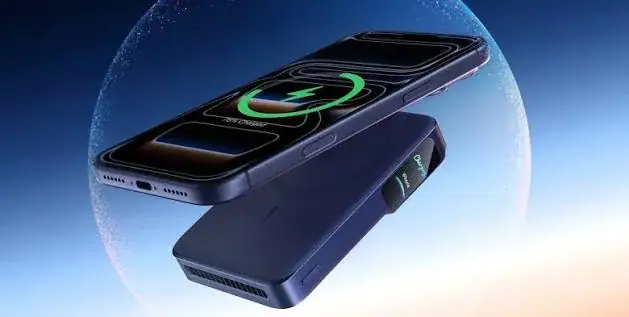
Wireless charging is convenient on a desk, at a bedside or in a car. The iPhone 18 Pro Max supports MagSafe and Qi2 at up to 25 W, where magnets align the phone and charger for efficient charging. Wireless charging is a little slower and warmer than wired charging, so use a cable when you are in a hurry. Remove thick or metal cases if they interfere, and keep cards with magnetic strips away from the back of the phone and the charger.
A MagSafe or Qi2 25 W charger is also helpful in a car mount, though in a hot car, avoid leaving the phone in direct sun on the charger for long.
Power banks for Kenyan conditions
Power cuts, long journeys and busy days make a power bank one of the most useful accessories in Kenya. Here is how to choose.
- Capacity. Power banks are rated in mAh. A bank of around 10,000 mAh gives roughly one to two phone charges, and 20,000 mAh gives more. Because Apple does not publish the phone's battery capacity, treat these as rough guides, and remember that real output is lower than the label because of conversion losses.
- Output. Look for USB-C Power Delivery output so the bank can fast-charge the phone. A bank limited to a low output charges slowly.
- Safety. Choose a reputable brand with a proper safety rating. Cheap banks may carry exaggerated capacity labels and weak protection.
- Size and weight. A bigger bank weighs more. Choose one you will actually carry.
- Airline rules. Power banks must travel in the cabin, not in checked luggage, and there are limits on capacity. Check the airline's rules before you fly.
- Cables. Carry a good cable with the bank.
For the home or office, consider a small uninterruptible power supply for your router, so that Wi-Fi stays on during short outages. That keeps your phone on Wi-Fi and saves mobile data and battery.
Dealing with power cuts and surges
Power in some areas can cut out and return with a surge. A surge can damage chargers and, in rare cases, devices. Use a surge-protected extension for your charger, avoid charging during storms, and unplug the charger if you will be away. Charge your phone and power bank when power is available, so you are not caught out.
Battery care: habits that protect battery health
All lithium-ion batteries wear with use. These habits slow the wear.
- Avoid heat. Do not leave the phone on a car dashboard, in direct sun, or under a pillow while charging. Heat is the biggest enemy of battery health.
- Use good chargers and cables. Avoid unbranded, uncertified products.
- Do not drain to zero often. Occasional low battery is fine, but frequently running it flat adds wear.
- Avoid keeping it at 100% for long periods when you can help it. Apple's optimised charging features can help by learning your routine. Look in Settings under Battery for charging options.
- Remove heavy cases during intense charging if the phone feels very warm. Some thick cases trap heat.
- Keep software up to date. Updates often include battery improvements.
- Reduce unnecessary drain. Lower screen brightness, turn off background refresh for apps you rarely use, and review location permissions.
- Use Low Power Mode when you need to stretch the battery. It reduces some background activity and visual effects.
- Check Battery Health occasionally. In Settings, Battery, you can see the maximum capacity as a percentage and any messages about the battery.
How to make the battery last longer in a day
If you know your day will be long, take these simple steps.
- Lower the screen brightness, or use auto-brightness.
- Use dark mode, which saves power on OLED screens.
- Turn on Low Power Mode when the battery drops below a comfortable level.
- Switch to Wi-Fi when it is available and reliable.
- Close apps that keep using location, such as maps, after you stop navigating.
- Turn off Bluetooth and hotspot when you are not using them.
- Carry a power bank, a cable and, if possible, a charger for the car or office.
When to worry about battery health
Batteries wear gradually, and a small loss in the first year or two is normal. Consider a battery check or replacement if the phone shuts down unexpectedly at a moderate charge, if the phone becomes very warm during light use, if the battery drains much faster than it used to, or if Settings shows a message about the battery needing service. Use authorised or reputable service providers, and avoid cheap unknown repairers who may fit poor-quality parts. A non-genuine part can trigger messages in Settings and affect performance.
If the phone swells, becomes very hot, smells strange or shows signs of damage, stop using it, unplug it and take it to a qualified technician. Do not try to repair a swollen battery yourself.
Water, charging and the USB-C port
The iPhone 18 Pro Max is rated IP68 for up to six metres for up to 30 minutes, as Apple lists. If the phone gets wet, dry it before charging, and do not plug a charger into a wet port. Apple notes that resistance can decrease with normal wear, and water damage is generally not covered by a warranty. Keep the port clean from lint and dust, which can stop a cable seating fully and cause slow or intermittent charging.
Charging habits at home, in the car and at the office
At home. Charge overnight on a surge-protected extension, away from pillows and bedding. Use a good charger and cable. Consider a MagSafe or Qi2 pad at the bedside.
In the car. Use a quality car charger that supports fast charging, with a good cable. Keep the phone out of direct sun when parked.
At the office. Keep a charger at your desk. A wireless pad makes topping up effortless between meetings.
On the move. Carry a power bank and a cable. Top up when you have a chance, instead of waiting until the battery is low.
Shopping list: charging accessories worth buying
- A 60 W USB-C charger with Power Delivery and PPS, for fast wired charging.
- A good USB-C to USB-C cable, rated for the wattage you want.
- A 10 Gb/s data cable, if you move large files.
- A MagSafe or Qi2 25 W wireless charger, for desk and bedside.
- A power bank with USB-C Power Delivery.
- A car charger that supports fast charging.
- A surge-protected extension.
- A sturdy case that does not trap heat.
We stock many of these. Ask our team on 0740 922 861, or visit the shop on Taveta Road.
Comparing the iPhone 18 Pro Max with other iPhones on battery
If battery life is your top priority, the Max is the clear choice among the current Pro iPhones. Apple lists up to 43 hours of video playback for the 18 Pro Max, against up to 39 hours for the 17 Pro Max and up to 34 hours for the 18 Pro. The 18 series also charges faster than the 17 Pro Max by Apple's figures, with about 50% in around 15 minutes on a 60 W capable adapter, against around 20 minutes on a 40 W or higher adapter. The smaller iPhone 18 Pro is lighter and easier to carry, but it asks for a top-up sooner on heavy days. If you are torn, think about how often you are near a charger. If you often are not, choose the Max. If you usually are, the smaller phone's battery is still very good.
Battery myths, answered
"You must drain the battery fully before charging." This was advice for very old battery types. Modern lithium-ion batteries do not need it, and regularly running the phone flat adds wear. Charge whenever it is convenient.
"Charging overnight ruins the battery." Modern iPhones manage charging and stop topping up when full. Heat is the real problem, so avoid charging under pillows or in hot spots, and use a good charger. Optimised charging features can reduce time spent at 100%.
"Fast charging damages the battery." Fast charging generates more heat, but the phone and a proper charger manage it. Using certified chargers and avoiding hot conditions is what matters. The phone slows charging as it fills, which is why the first half is the fastest.
"A higher wattage charger will hurt my phone." The phone only draws what it can accept. A 60 W adapter does not force 60 W into a phone that can use less.
"Closing all my apps saves battery." Closing apps you are not using rarely helps, since iOS manages them efficiently, and reopening them can use more power. It is better to remove apps that misbehave and limit background refresh for ones you rarely use.
"Any cable will do." A poor cable can slow charging, overheat or fail. Use quality cables, and use a rated one for fast charging and for USB 3 data speeds.
"Wireless charging is bad for the battery." It is a little warmer and slower than wired charging, but it is safe with a quality MagSafe or Qi2 charger. If the phone becomes very warm, switch to a cable.
A day of charging with the iPhone 18 Pro Max
Imagine a typical Nairobi weekday. You wake at six with the phone at a high level after charging overnight. You check messages, use maps for the commute, listen to music or a podcast, take calls, reply to emails and WhatsApp messages, and take a few photos. By lunchtime the phone is comfortably above half. You spend the afternoon on calls, a video meeting and some browsing. By late afternoon you may see about a third left, which is plenty for the commute and an evening of messaging. If you stream video at night, you may top up for a few minutes beforehand. Most owners of a Max find they do not worry about the battery on days like this, which is a pleasant change from older phones.
A heavier day, such as a wedding with photos and video, a safari with navigation and zoom, or a long drive with GPS and hotspot, calls for a power bank and a fast car charger. The fast-charging figure is your friend here: ten or fifteen minutes during a coffee stop can add a large share of charge if you have the right adapter.
Travelling with the phone
When you travel, bring your own charger and cable instead of relying on whatever is in the hotel or lounge. Carry a power bank in your cabin bag, never in checked luggage. If you travel abroad, check the plug type for the country you visit, and bring an adapter, remembering that a plug adapter changes the shape of the plug and does not convert voltage. Modern phone chargers usually accept a wide voltage range, but check the label on yours. Use airport charging points only if you trust them, or better, use your own power bank, since public USB ports can carry risks. Keep the phone out of hot cars and direct sun, and use airplane mode or low power mode on long flights to save charge.
On safari or in remote areas, power can be limited for days. Bring a large-capacity power bank, a car charger and a spare cable, and turn on low power mode when you do not need all features. Take photos and videos with purpose, and avoid unnecessary screen time between shots.
Business owners and teams
For a business with several phones, charging is a management question as well as a personal one. Set up a charging station with surge-protected extensions and good chargers, so staff can top up during the day. Keep spare cables, since cables are the part that fails most often. If your team uses phones for deliveries, sales calls or payments, add car chargers and power banks to the standard kit. Keep a note of when phones were bought and whether any have shown battery problems, so you can service them before they cause trouble. If you want help equipping a team, call Sales on 0740 922 861 and we can suggest a sensible kit.
Troubleshooting charging problems
The phone charges slowly. Check the charger wattage and the cable. A low-power adapter or a poor cable is the commonest cause. Clean lint from the port gently with a wooden or plastic toothpick, taking care not to damage it. Charge in a cool place, since the phone slows charging when warm.
The phone does not charge at all. Try a different cable and adapter, and a different socket. Check the port for lint or damage. Restart the phone. If it still fails, visit us or a trusted service centre.
The phone gets very warm while charging. Remove the case, stop using demanding apps while charging, and move it out of sun and away from bedding. If it stays very hot, unplug it and have it checked.
The battery drains quickly after an update. The phone often does extra background work for a day or two after an update. If the drain continues, check Settings, Battery for apps using a lot of power, and review background refresh and location permissions.
The charge percentage jumps or the phone shuts down early. This can be a sign of an ageing battery or a fault. Check Battery Health in Settings, and have the phone assessed.
Wireless charging stops or starts repeatedly. Check alignment, remove metal objects or thick cases between the phone and charger, and use a certified charger.
If troubleshooting does not fix the issue, bring the phone to us with your receipt. Us on 0740 922 861 can guide you through warranty questions, and warranty cover depends on the market version and the terms we confirmed for your unit.
Environmental and cost-saving habits
Good charging habits also save money and waste. A quality charger and cable last for years, while cheap ones need replacing repeatedly. A phone whose battery is cared for keeps its full performance longer, which delays the need for a battery service or a new phone. Unplugging chargers that are not in use saves a little electricity. And recycling old chargers and cables, instead of throwing them away, reduces waste. These small things add up over a phone's life of several years.
Checklist before you buy a charging kit
- Confirm the phone has a USB-C port, and decide how fast you want to charge.
- Choose an adapter of 60 W or more with Power Delivery and PPS for the fastest charge, or about 35 W for a balance.
- Buy a quality cable rated for the power you want, and a 10 Gb/s cable if you move large files.
- Add a MagSafe or Qi2 charger if you want wireless charging.
- Add a power bank with USB-C Power Delivery.
- Add a car charger if you drive.
- Use a surge-protected extension at home and in the office.
- Buy from a seller you can find again, who gives a receipt and a warranty.
Buying the phone safely
A battery that is healthy on day one starts with a phone that is genuinely new. Check the IMEI against the box, check the serial number on Apple's coverage page, confirm that the phone is not locked to another Apple Account, and look for signs of repair. Our guide at /guides/how-to-spot-a-fake-or-locked-iphone-in-kenya explains each step. Also confirm the SIM version you need, which we cover at /guides/iphone-18-pro-max-esim-vs-physical-sim-kenya-which-to-buy.
Frequently asked questions
How long does the iPhone 18 Pro Max battery last? Apple lists up to 29 hours of typical use, up to 43 hours of video playback and up to 38 hours of streamed video. Real results vary with use.
How fast does it charge? About 50% in around 15 minutes with a 60 W capable adapter that supports Adjustable Voltage Supply, per Apple.
Does it come with a charger? Apple lists the phone and a USB-C charge cable. No power adapter is listed.
What battery capacity does it have? Apple does not publish the capacity in mAh, so we do not quote one.
Does it support wireless charging? Yes, MagSafe and Qi2 up to 25 W.
Can I use my old charger? Yes, if it is USB-C and of good quality. It may charge more slowly than a 60 W adapter.
What size power bank should I buy? A bank of around 10,000 mAh suits most days. A larger one suits travel and long shoots. Choose a reputable brand with USB-C Power Delivery.
Is it safe to charge overnight? Generally yes with a good charger and cable, on a stable surface away from bedding, and with a surge-protected extension.
How can I check my battery health? Open Settings, then Battery, and look at the battery health information.
Do you sell chargers and power banks? Yes. Ask our team for options.
Do you deliver outside Nairobi? Yes, by courier within one to three business days. In Nairobi, orders placed before 3pm are delivered the same day. We accept M-Pesa, and shop collection is free.
How to order
Call Sales on 0740 922 861 or write to [email protected] with the phone and accessories you want. Visit us at New Alnoor Exhibition, Shop 7, Second Floor, Taveta Road, Nairobi CBD, Monday to Friday 9am to 7pm and Sunday 11am to 4pm, closed Saturday. For help after purchase, We're on 0740 922 861.
Related guides
- iPhone 18 Pro Max buying guide: /guides/iphone-18-pro-max-buying-guide-kenya-storage-colour-sim-warranty
- iPhone 18 Pro Max features explained: /guides/iphone-18-pro-max-features-explained-a20-pro-camera-battery-usb3
- iPhone 18 Pro Max camera guide: /guides/iphone-18-pro-max-camera-guide-kenya-photos-video-low-light-zoom
- iPhone 18 Pro Max vs iPhone 18 Pro vs iPhone 17 Pro Max: /guides/iphone-18-pro-max-vs-iphone-18-pro-vs-iphone-17-pro-max-kenya
- Shop all iPhones and accessories: /
Final word
The iPhone 18 Pro Max has the longest battery life of the Pro line and some of the fastest charging Apple offers, but you still need to bring the right charger, cable and habits. Buy a good 60 W adapter, a reliable cable and a power bank, keep the phone cool, avoid cheap chargers, and charge on a surge-protected extension. Do those things and the battery will serve you well through years of long Kenyan days. If you want help choosing, visit our shop on Taveta Road, and we will build a charging kit that fits your phone and your life.